By: Mahmoud Darwish
There is a moment in every multi-component upgrade where the heavy lifting feels like it is behind you, and you exhale a little too early.
After Article 1, the OMR was on Oracle Database 19.30 with GI MRP 39168344 applied, datapatch reporting SUCCESS, and the cluster healthy on both nodes. After Article 2, both OMS instances were on 24.1.0.8 plus Holistic 38864999, the console stayed responsive throughout, and the team had switched from offline mode to Online MOS via IDCS. The change request closed cleanly. For about ten minutes, I felt like the upgrade was done.
Then I opened Setup → Manage Cloud Control → Agents and the version column told me the truth. A fleet of Management Agents still on 24.1.0.5, sitting on every monitored host, dutifully shipping metrics to a pair of OMS instances that had moved on without them.
Agents are the part of OEM that nobody thinks about until they have to. There is no Saturday-night maintenance window for them. There is no executive tile that turns yellow when one falls behind by an RU. They sit on database hosts, application hosts, OS hosts. Each one is a tiny dependency. Each one breaks in its own creative way. And there are too many of them to handle one at a time.
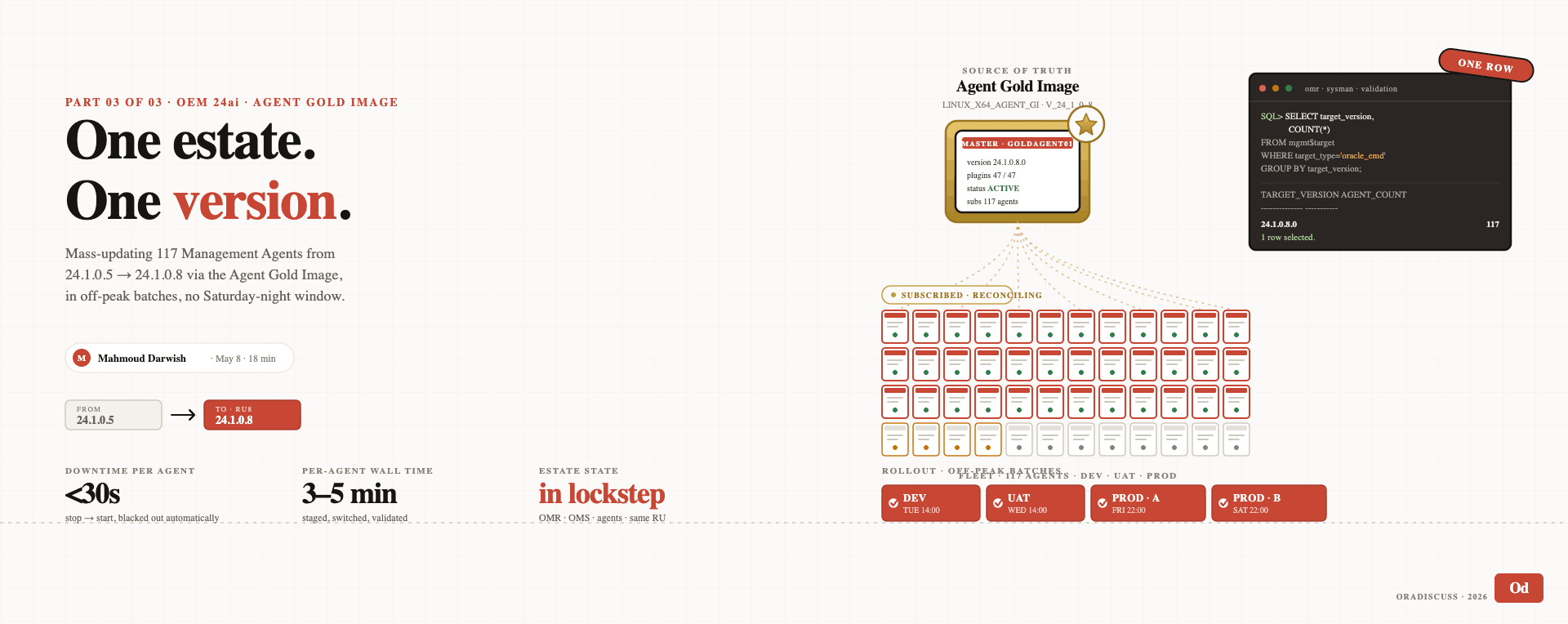
This is the third and final post in the series. It covers exactly what happens between “OMS is on RU8” and “the entire estate is on RU8”, pushing the agent update out to every monitored host using the OEM Patch Plan workflow under Enterprise → My Oracle Support → Provisioning and Patching, and validating that the entire fleet has landed at 24.1.0.8.
Three articles. Three layers. One coherent estate. Let’s close it out.
Why You Cannot Just Leave the Agents Behind
The first question a few DBAs on my team asked, and a fair one, was: do we really need to upgrade the agents right away? The OMS is on RU8. Monitoring is working. Alerts are firing. Dashboards are green. Why hurry?
Two reasons.
First, the supported version skew is narrow. Oracle’s stated policy for OEM 24ai is that agents are supported at the same RU as the OMS or one RU behind. Once the OMS is at 24.1.0.8, agents at 24.1.0.5 are formally three RUs back. A lot of things still work, OEM is more forgiving here than it has any right to be, but you are accumulating risk. New plug-in versions, new metric extensions, and new corrective action types may not deploy correctly to agents that are too far behind. Some plug-ins outright refuse to deploy below a minimum agent version. Future Holistic patches will assume the agents are reasonably current.
Second, the agents see all the new things last. Every RU between 24.1.0.5 and 24.1.0.8 includes agent-side changes: fixed memory leaks in the metric collector, new metric definitions, JDK updates that close CVEs, support for newer target types. Until the agent is on the same RU as the OMS, you are running the OMS on the 2026 codebase while the agents are running the metric collectors from a year ago. The fleet feels less responsive than it should. That feeling is real.
The agents come along. The only question is when, and the right answer is “as soon as the OMS is stable on the new RU.”
Why Online MOS Mode From Article 2 Pays Off Here
This is where the connectivity flip from the previous article delivers in a way I did not fully appreciate when we made the change.
In offline mode, getting a new agent patch onto the OMS is a manual choreography. Download the agent patch from MOS, stage it on the OMS, import it via the offline catalog, then make it available to Patch Plans. Half a day of moving zip files around for nothing.
In online mode, OEM does the prep for you. The moment you search for a patch in the console, OEM reaches out to MOS in real time, finds the patch, and makes it available to apply. There is no staging step. There is no download step. The console treats MOS as if it were part of the local environment.
If you are still in offline mode at this stage of the series, push for the security exception. The operational savings on the agent side alone are worth the security review.
The Method I Used — Patch Plan via Provisioning and Patching
OEM 24ai supports two equally valid approaches for mass agent updates: the Agent Gold Image model for ongoing fleet hygiene, and the Patch Plan model for direct, targeted patch application. Both are documented. Both work. The right answer depends on your specific situation.
For a single RU8 upgrade across an existing fleet, I went with the Patch Plan approach. Here’s why:
- No image to build first. Building a Gold Image adds setup overhead that is not strictly necessary for a single RU upgrade.
- The Patch Plan wizard is genuinely well-designed. Search the patch, select target agents, schedule, submit. The UI walks you through every step.
- Standard Job tracking. The update runs as a regular OEM Job, you watch it in Enterprise → Jobs → Activity with full per-agent status visible.
- Rolling under the hood. The Patch Plan applies the patch to agents in a controlled rolling fashion. Monitoring stays continuous because not all agents are taken down at once.
For long-term fleet hygiene with plug-in version enforcement, Gold Image is the right answer. For a single RU rollout, Patch Plan is the practical choice. I’ll cover Gold Image in a future post, for this article, we focus on what we actually did.
Step 1: Find the Agent RU8 Patch
The starting point is the My Oracle Support Patches & Updates view inside OEM. Navigate to:
Enterprise → My Oracle Support → Patches & UpdatesThis page is your gateway to MOS from inside OEM. In Online mode, it talks directly to My Oracle Support and surfaces patches applicable to your environment.
In the Patch Search section, search for the OEM 24ai RU8 agent patch number, 38735209. This is the agent-side patch corresponding to OMS RU8.
When the patch appears in the results, click on it to open the patch details. You’ll see:
- Patch number: 38735209
- Description: Enterprise Manager Agent Bundle Patch 24.1.0.8.0
- Applicable target types: Management Agent
- Platform: Linux x86-64 (or whichever platform matches your fleet)
Confirm this is the patch you want, then click Add to Plan → Create New Plan.
Step 2: Create the Patch Plan
The Create Patch Plan wizard opens with the patch already pre-selected. Configure the plan:
| Field | Value |
| Plan Name | OEM_24ai_RU8 (or your naming convention) |
| Patch | 38735209 (already populated) |
| Description | Free text — I used “Mass agent update from 24.1.0.5 to 24.1.0.8” |
| Allow ad-hoc patches | Yes (lets you adjust agent selection later if needed) |
Click Create Plan. You now have an empty plan with the agent patch attached but no targets selected yet.
Step 3: Add the Target Agents to the Plan
Inside the plan, navigate to the Targets section. This is where you select which agents will receive the patch.
Click Add → All Targets (or Add → Selected Targets if you want to be more deliberate). For a fleet-wide update, the simplest approach is:
Targets section → Add → All applicable targetsOEM filters the target list to show only agents that are eligible for this specific patch. Eligible means: matching platform, currently below the patch’s target version, and reachable via the OMS.
In our environment, this returned the full agent fleet, every Linux x86-64 agent currently at 24.1.0.5. Select all of them.
OEM shows a summary at the bottom: total agents selected, current version, target version. Confirm the numbers match your inventory before proceeding.
Step 4: Validate the Plan
Before you can deploy a Patch Plan, OEM requires you to Analyze it. This is the equivalent of the opatchauto -analyze step we ran in Article 1, a non-destructive check that verifies the patch can apply cleanly to every selected target.
Click Analyze. OEM submits a background analysis job and shows the progress in the Validation section.
What the analysis checks:
- Connectivity to each agent
- Free space on each agent host
- Patch conflict against existing patches on the agent
- Plug-in compatibility
- Credential availability for each target
When the analysis completes successfully, green checkmarks across the board, the plan is ready to deploy. If any agent fails analysis, click into it to see the specific issue. Most analysis failures are credentials or connectivity issues that can be fixed in OEM and re-analyzed without modifying the plan itself.
Step 5: Deploy the Patch
With analysis successful, the Deploy button activates. Click it.
OEM presents the deployment summary one more time before final submission:
- Patch: 38735209
- Number of targets: (your agent count)
- Schedule: Immediate or scheduled
- Rolling mode: Yes (this is the default for agent patches and the reason it can run safely during business hours)
I selected Immediate and let it run during working hours. The reason this is safe, and this is the part that matters operationally, is that the patch deployment runs in rolling mode at the fleet level. OEM does not take every agent down at the same moment. It cycles through agents in controlled parallel batches, so the monitoring impact on any single host is a 30-second restart, and the impact across the fleet is genuinely minimal.
Click Deploy. The plan transitions to In Progress status and OEM submits the actual update job.
Step 6: Watch It Run
The patch deployment is now a standard OEM Job. You can monitor it from two places:
Inside the Patch Plan itself: The plan’s status page shows real-time progress with per-agent status. Each agent moves through the states: Pending → In Progress → Success (or Failed if something goes wrong). You see the count climbing in real time.
From the Job Activity view:
Enterprise → Jobs → Activity → Filter by Type: PatchThis is the same job tracking interface used for every OEM job. It gives you per-agent log output, retry capability, and the same operational tools you already know from any other batch job in the system.
In our environment, the entire mass update, every agent in the fleet, from start of deployment to all agents reporting back at 24.1.0.8, took approximately 30 minutes. During that 30-minute window, monitoring stayed continuous, alerts kept firing, dashboards stayed green, and not a single user noticed anything was happening. The rolling approach worked exactly as advertised.
That detail is worth pausing on. Thirty minutes. During working hours. With no perceptible impact. If you had told me ten years ago that this would be the experience of mass-patching an OEM agent fleet, I would have said you were optimistic. It is the new reality with OEM 24ai on a properly architected estate.
Step 7: Estate-Wide Validation
When the Patch Plan completes, the validation question is the simplest in the whole upgrade: is every agent in the estate at 24.1.0.8?
Three views, each catches a different class of mistake.
View 1: Agent count by version, from the OMR:
-- Connect to the OMR as SYSMAN
SELECT
    target_version,
    COUNT(*) AS agent_count
FROM
    mgmt$target
WHERE
    target_type = 'oracle_emd'
GROUP BY
    target_version
ORDER BY
    target_version;
Expected output after a clean run:
TARGET_VERSION    AGENT_COUNT
----------------  -----------
24.1.0.8.0        80
A single row at the new version. If you see two rows, you have stragglers — agents that didn’t make it through the deployment for some reason.
View 2 — Agents not yet on 24.1.0.8 via SQL:
SELECT
    target_name,
    target_version,
    type_meta_ver
FROM
    mgmt$target
WHERE
    target_type = 'oracle_emd'
    AND target_version <> '24.1.0.8.0';
Expected: zero rows. If non-empty, those agents need investigation, typically they failed during the patch deployment and need to be addressed individually before re-running the plan against just them.
What Changed in My Daily Operations
Three changes from the agent side, complementing the OMS-side changes from Article 2:
Agent updates are now a same-day operation, not a quarter-long project. With the OMS on RU8 and Online MOS pulling the patch information automatically, the time from “OMS upgrade complete” to “estate on the new agent RU” went from weeks to thirty minutes. No more side-quest that drags into the next quarter and quietly never finishes.
Agent patching is no longer scheduled around business hours. This is the cultural shift. Agent updates were always a “schedule it for the weekend” operation in my career, with rolling mode at the fleet level, that is no longer true. We patched this fleet during a Tuesday afternoon. Nobody on the business side noticed. The change request closed without a maintenance-window line item.
Agent-related SRs are nearly extinct. When I worked at Oracle Support in the OEM Support Group, agent issues, agents going unreachable, agents reporting wrong target versions, agents with broken plug-ins, were a meaningful share of the SR queue every week. With the fleet aligned to the OMS RU and the agents kept current, the structural conditions that produced those SRs mostly do not exist anymore. Agents are still software and they will still find new ways to misbehave, but the version-drift problems are solved at the architecture level rather than one ticket at a time.
Closing the Series
Three articles. Three layers. One estate.
Article 1: The OMR repository database, patched from 19.28 to 19.30 with GI MRP 39168344, validated at the binary, dictionary, and connectivity levels. Foundation: correct.
Article 2: The OMS, upgraded from 24.1.0.5 to 24.1.0.8 via ZDT through omspatcher, plus Holistic 38864999 covering WebLogic, JDK, OPatch, and FMW DB Client, plus the connectivity flip from offline to Online MOS via IDCS. Middle layer: modern.
Article 3: The agents, mass-updated from 24.1.0.5 to 24.1.0.8 via the OEM Patch Plan workflow under Provisioning and Patching, deployed in rolling mode during working hours, completed in 30 minutes, validated estate-wide via SQL. Edge: in sync.
The pattern Oracle is signaling with OEM 24ai is that the platform is now safe to update on the same operational rhythm as the database itself. Patch the repository on a quarterly cadence. Patch the OMS via ZDT during business hours. Push agent updates via Patch Plan in rolling mode the same week. The Saturday-night maintenance window for OEM, the one I have been booking on the team calendar since 10g, is genuinely retired.
For the readers who have been around long enough to remember emctl start oms, watching the console come back up with a deep breath, hoping nothing critical happened during the gap, this is a different product than the one we started with. Worth the upgrade. Worth the effort. Worth the three articles.
If you are starting your own RU5 to RU8 upgrade after reading this series, the order is OMR first, OMS second, agents third. Skip the order at your peril. Read the README, all of it. And remember that the foundation is the database, the middle is the OMS, and the edge is the agents, and a healthy estate has all three layers in lockstep.
Some old friends age well. This one did, and now the whole fleet is along for the ride.
View 3: Agent status summary via emcli:
$OMS_HOME/bin/emcli login -username=sysman
$OMS_HOME/bin/emcli get_targets \
    -targets="oracle_emd" \
    -format="name:csv;script" \
    | grep -v "24.1.0.8.0"
Expected: only the header line. Any data rows mean stragglers.
When all three views return what they should, the estate is on RU8. The agents are caught up.