By: Mahmoud Darwish
It is all about expectations…
Too many times I’ve sat in front of a new OEM release, gone through the feature list, and thought, okay, that’s nice, but it doesn’t change my Tuesday morning.
I want to start this post with a small confession. When I saw the announcement for Oracle Enterprise Manager 24ai back in December 2024, my first reaction was not excitement. It was more like… cautious curiosity. Maybe even a little skepticism. Because I’ve been around long enough to know that every major OEM release comes with a lot of promises, a few rough edges, and at least one thing that breaks something you were depending on quietly for years.
I’ve been working with Oracle Enterprise Manager since version 10g. That’s not a typo. Version 10g. The one with the chunky Java-heavy interface that could make a modern machine feel like it was running on dial-up. I remember the days when deploying an OEM agent on a target host was its own weekend project, and when the OMS going down for patching meant your entire monitoring capability went dark, and you just… waited.
And then there’s another layer to this story that shapes how I look at OEM differently from most DBAs. For a period of my career I worked at Oracle Support in the Global Customer Support (GCS) team, specifically in the OEM Support Group. That experience was formative in ways I still feel today. When you spend your days answering SR after SR from customers who are either confused by OEM, frustrated by OEM, or desperately trying to get OEM to do something it technically could do but wasn’t obvious how, you develop a very specific opinion about what a good OEM release looks like. You stop looking at features from the marketing angle and start asking: does this actually reduce the number of SRs I would have filed for this?
With that context, let me tell you what I think about OEM 24ai. Because this one is genuinely different.
What Is OEM 24ai, Actually?
Let’s sort out the naming first, because people were confused when this was announced.
Oracle Enterprise Manager 24ai was announced at the OEM Technology Forum in December 2024 and released shortly after. It’s the successor to EM 13.5, and like the broader Oracle naming convention shift we saw with the database (23ai → 26ai), the “ai” in the name is intentional, Oracle is signaling that AI capabilities are not a bolt-on feature in this release, they’re architectural.
From a versioning standpoint, EM 24ai follows a Release Update (RU) model, the same agile patching philosophy Oracle adopted for the database. Each RU is cumulative, so RU4 includes everything from RU1, RU2, and RU3. The general guidance is: apply the latest RU as soon as it’s available. As of the time I’m writing this, we’re up to RU8.
Customers on EM 13.5 (RU22 through RU24) can upgrade directly. If you’re on something older, you need to get to 13.5 RU22 first. Oracle extended 13.5 Premier Support through December 2026, so there’s some runway, but don’t use that as an excuse to sit still.
Why This Release Is Different From Someone Who’s Seen Them All?
I want to be specific here rather than just listing features, because feature lists are what press releases are for. What I want to explain is what problem each thing actually solves, because that’s the lens I’ve always used when looking at OEM.
1. Zero Downtime Monitoring and Zero Downtime Patching
This one is personal for me.
One of the most common categories of SRs I used to handle in the OEM Support Group was some variation of: “OEM went down for maintenance and we missed a critical alert.” Or “We were patching OEM and the database had an issue and nobody knew about it until 30 minutes later.” It happened constantly. Not because the customers were doing anything wrong, it’s just how OEM was architected. When the OMS was down, monitoring was down. Period. Always-on Monitoring (AOM) was the workaround, and while it helped, it was always a secondary, limited system.
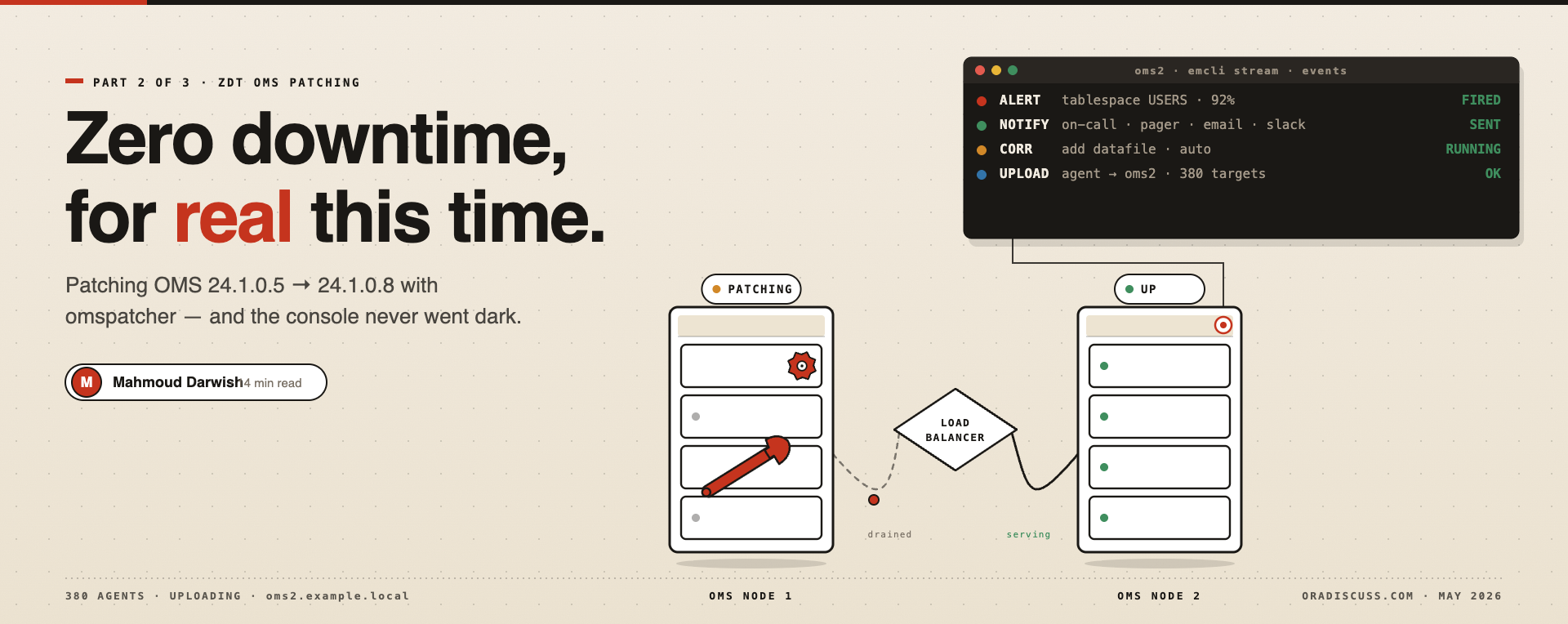
EM 24ai fixes this at the architectural level. The new Zero Downtime Monitoring (ZDT Monitoring) service runs as a separate component of the OMS and continues processing events, alerts, notifications, corrective actions, and incident creation, even while the OMS itself is being patched. No AOM needed. No blind spots. You’re doing a Release Update on your EM 24ai environment and your critical database fires a tablespace full alert, it still gets processed, the corrective action still fires, the notification still goes out. That’s what the old architecture couldn’t do.
The companion to this is Zero Downtime Patching (ZDT Patching). Instead of the old model where you shut down OMS, apply the patch, restart, and hope nothing happened while you were blind, ZDT Patching uses Oracle’s Edition-Based Redefinition (EBR) technology under the covers to update the EM schema in a separate edition while EM is still running. The OMS gets patched in a rolling manner, one OMS node at a time in a multi-OMS setup. The monitoring never gaps.
Two requirements worth knowing: you need at least two OMS servers for full ZDT Patching coverage, and this only works for EM 24ai → EM 24ai RU upgrades. The upgrade from 13.5 to 24ai itself still uses the classic approach.
Is this a game-changer? For anyone running EM in a high-SLA environment, yes, genuinely. I would have closed a lot of SRs faster if this had existed earlier.
2. AskEM, The GenAI Assistant Inside OEM
This shipped with RU4, and I’ll be honest, when I first heard “AI assistant inside OEM,” my eyebrow went up. We’ve all seen AI features bolted onto products that don’t really need them, generating responses that are technically accurate but practically useless.
Ask EM is not that.
The way it works: there’s a small chat icon in the top right of the EM 24ai console. You click it and you get a conversational interface where you can ask operational questions in plain English. The backend connects securely, over HTTPS, to OCI’s GenAI service and Ops Insights. And here’s the architectural detail that matters: only your question is transmitted to Oracle Cloud. None of your EM data, none of your target information, none of your database metrics leave your environment. Oracle was very deliberate about this, and it’s the right call for enterprise security requirements.
Two modes:
Telemetry questions: “Which of my databases had I/O spikes last night?” or “Show me databases where apply lag exceeded 30 seconds this week.” These pull from your actual OEM telemetry via Ops Insights and give you real answers from your real environment.
Documentation questions: “How do I troubleshoot buffer busy waits?” or “What does the gc current blocks received metric mean on Exadata?” These use RAG (Retrieval-Augmented Generation) against Oracle’s full documentation library, indexed in Oracle Database 23ai, and return contextually accurate answers with clickable reference links to the actual source documents.
The setup requires an OCI account with Ops Insights enabled and connection to the us-chicago-1 GenAI region (more regions coming). The Ask EM Configuration Wizard walks you through it, three screens, maybe 15 minutes if your OCI credentials are ready.
From a practical standpoint, think about the junior DBA on your team who needs to investigate an alert at 10pm but isn’t sure which V$ views to query or what the metric pattern means. Instead of either waking you up or making a mistake, they open Ask EM and ask the question. That’s real operational value.
3. Remote Agents is Finally Solving the Agent Sprawl Problem
If you’ve managed a large OEM estate, you know the pain. Every target requires an agent on the same host. Hundreds of agents, each needing lifecycle management, patching, OS-level credentials, and periodic TLC when they go unreachable. Managing the agents starts taking as much time as managing the databases they’re monitoring.
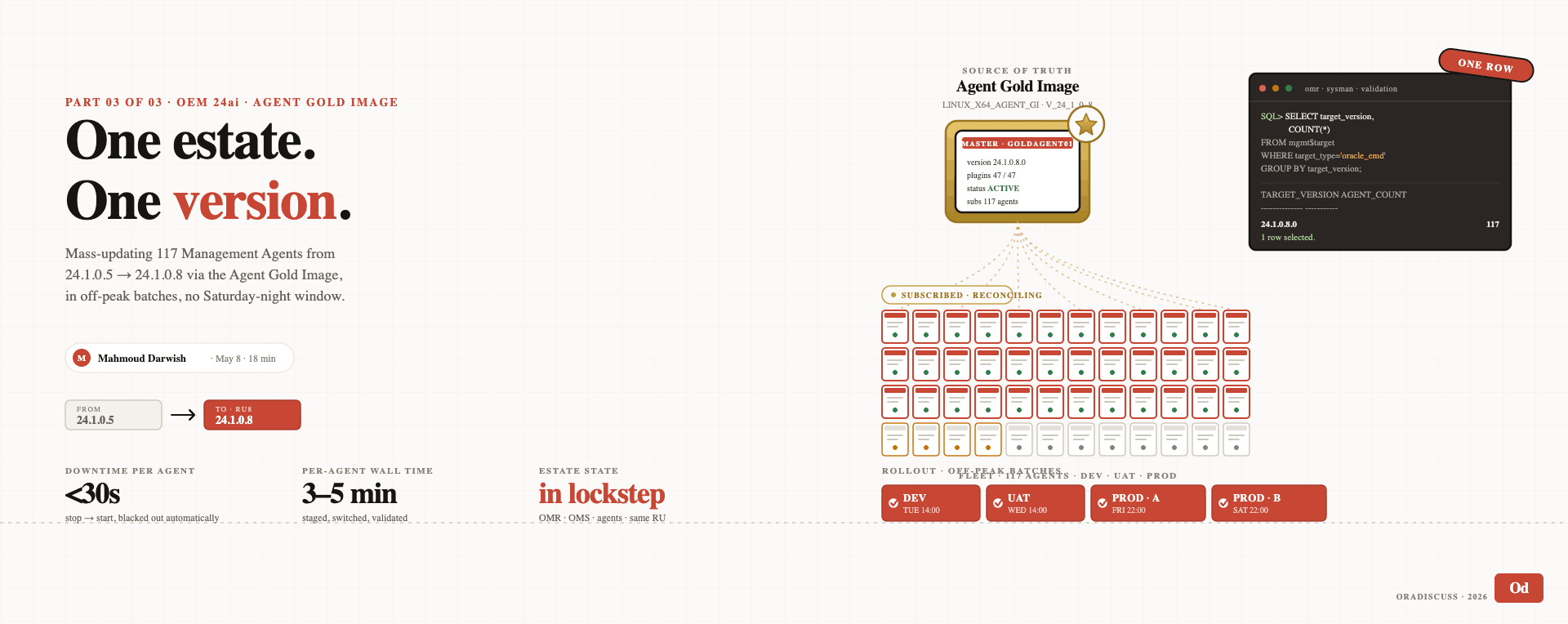
EM 24ai introduces Remote Agents, a new agent type that can monitor and manage targets on other hosts without requiring a local agent installation. You deploy one Remote Agent (or a pool of them for HA) and it reaches out to remote targets using standard protocols. Targets get discovered and monitored without touching the target host’s agent lifecycle at all.
For environments where deploying agents is a bureaucratic challenge, change management processes, security team approvals, production host change freezes, this is genuinely transformative. You can monitor targets that you could never get an agent onto before.
Remote Agent pools also provide HA for the agents themselves. If one Remote Agent is unavailable, others in the pool take over, another operational continuity improvement that directly reduces alert gaps.
4. AI Cloud Extensions, Capacity Planning and SQL Insights Without Leaving OEM
This one requires a bit of setup but delivers real analytical value once it’s running.
AI Cloud Extensions bridges OEM 24ai with OCI Operations Insights, specifically two capabilities: Capacity Planning and SQL Insights. Once configured, these appear as tabs directly within the database’s Resource page inside OEM, no context switching, no separate OCI console session, no separate report export.
Capacity Planning uses up to 25 months of historical AWR data (fed into Ops Insights) to give you trend-based projections of CPU, memory, I/O, and storage. Not a straight-line extrapolation, but actual ML-based forecasting. The question it answers is: “At current growth rates, when does this database exceed capacity?” You get an answer in OEM, in the context of the specific database you’re looking at.
SQL Insights surfaces SQL performance anomalies across your fleet using machine learning, queries whose execution time has degraded outside their normal variance, plans that have regressed, SQL that accounts for disproportionate resource consumption compared to its historical baseline. You get this inside OEM, in context, rather than having to run AWR comparison reports and build the analysis manually.
The requirement is an OCI tenancy with Ops Insights enabled, and the Diagnostics Pack license for the databases whose data you’re feeding in. The configuration steps are documented well and the EM A-Team published a clear walkthrough if you search for it.
5. SQL Performance Analyzer Gets a Modern Interface
Longtime OEM users will remember SQL Performance Analyzer (SPA) as one of the most powerful and most frustrating tools in the product. Powerful because what it does is genuinely valuable, analyze the impact of a database upgrade, a parameter change, or a statistics refresh on your entire SQL workload before you touch production. Frustrating because the old interface was, let’s say, not intuitive. Lots of clicking, non-obvious workflow, dense output that required experience to interpret.
In EM 24ai (RU1), SPA got a complete UI overhaul built on Oracle’s JavaScript Extension Toolkit (JET). The new interface has:
- Graphical charts for task and trial overview instead of dense tables
- A unified creation workflow, basic mode for common use cases, advanced mode when you need full control
- Streamlined reporting with a summary overview before you drill into individual reports
- Parallel statement execution to cut down the time SPA tasks take to complete
From a practical standpoint: if you’re about to upgrade a production database from 19c to 26ai and you want to validate your SQL workload first, SPA is the tool you should be running. The new interface removes most of the excuses for not using it.
6. New Navigation and Dashboard Enhancements
This sounds small but it matters for day-to-day operations. The OEM 24ai console has a redesigned navigation menu with a global search capability, type any target name, metric, or administration option from anywhere in the console and go directly to it. For someone managing hundreds of databases across multiple environments, this alone saves a surprising amount of clicking time every single day.
Dashboard enhancements let you control the time window for displayed data more flexibly, and a new Edit Dashboard Privileges feature gives you proper role-based control over who can see and edit shared dashboards. In a team environment where multiple DBAs share an OEM instance, this matters for both security and sanity.
What I Actually Changed in My Daily Routine Since OEM 24ai
Let me be specific about what shifted operationally once we moved to 24ai, because I think that’s more honest than just describing features:
OEM patching is no longer a Sunday night event. ZDT Patching means we apply RUs in a rolling manner during business hours, with monitoring running continuously. The old “OEM patching = DBA on call all weekend” pattern is gone.
My first response to a new alert now includes Ask EM. Before escalating or spending time in documentation, I ask Ask EM for context. About half the time it gives me a useful starting direction immediately. The other half, it at least confirms what I already suspected and points me to the right documentation section.
Capacity planning conversations with management are now data-driven. The Capacity Planning extension gives me defensible, ML-based storage and CPU projections that I can share directly with leadership. “The database will run out of tablespace space in approximately 4 months at current growth” is a much better conversation than “we should probably add storage soon.”
Junior DBAs on my team are more self-sufficient. Ask EM is genuinely useful as a first-line resource for less experienced team members. They can investigate alerts and get initial context without immediately escalating, which means my time is spent on the things that actually need senior attention.
One Thing to Watch Out For..
I want to be fair: there are a couple of rough edges.
Ask EM currently requires OCI GenAI in the us-chicago-1 region. If your organization has data residency requirements that prevent OCI connections from your on-premises environment, you need to check compliance before enabling it. The architecture is designed so no target data leaves your environment, only your question text, but the legal and compliance check is still necessary for regulated industries.
AI Cloud Extensions requires Ops Insights, which is a separate OCI service with its own cost model. For large estates feeding 25 months of AWR data for many databases, size the Ops Insights costs before committing.
Should You Upgrade?
If you’re on EM 13.5 and it’s working fine, yes, plan the upgrade. The ZDT Monitoring and ZDT Patching capabilities alone justify it for any environment with meaningful SLAs. Add Ask EM and AI Cloud Extensions, and the operational time savings add up quickly.
If you’re already on EM 24ai base release, apply RU4 or later immediately. Ask EM is the reason, but all the cumulative stability fixes make every RU worth applying on their own.
And if you’re someone like me, someone who’s been around long enough to remember typing emctl start oms and staring at the console waiting, or spending hours in an SR queue helping customers figure out why their OEM agent went unreachable again, this release will feel like a genuinely earned upgrade.
Some old friends age well. This one did.
By: Mahmoud Darwish